One flow. One place.
Map every page, get the copy written, sign it off and hand it to your designer. One place for the whole website, instead of slides, docs and email threads.
DraftBay is a website content planning tool for agencies, freelancers and small businesses: sitemap, copy, approval and hand-off in one place, for $19 a month per workspace.
New 27 Oct: sort the sitemap your way, and a Version column in the table. What's new →
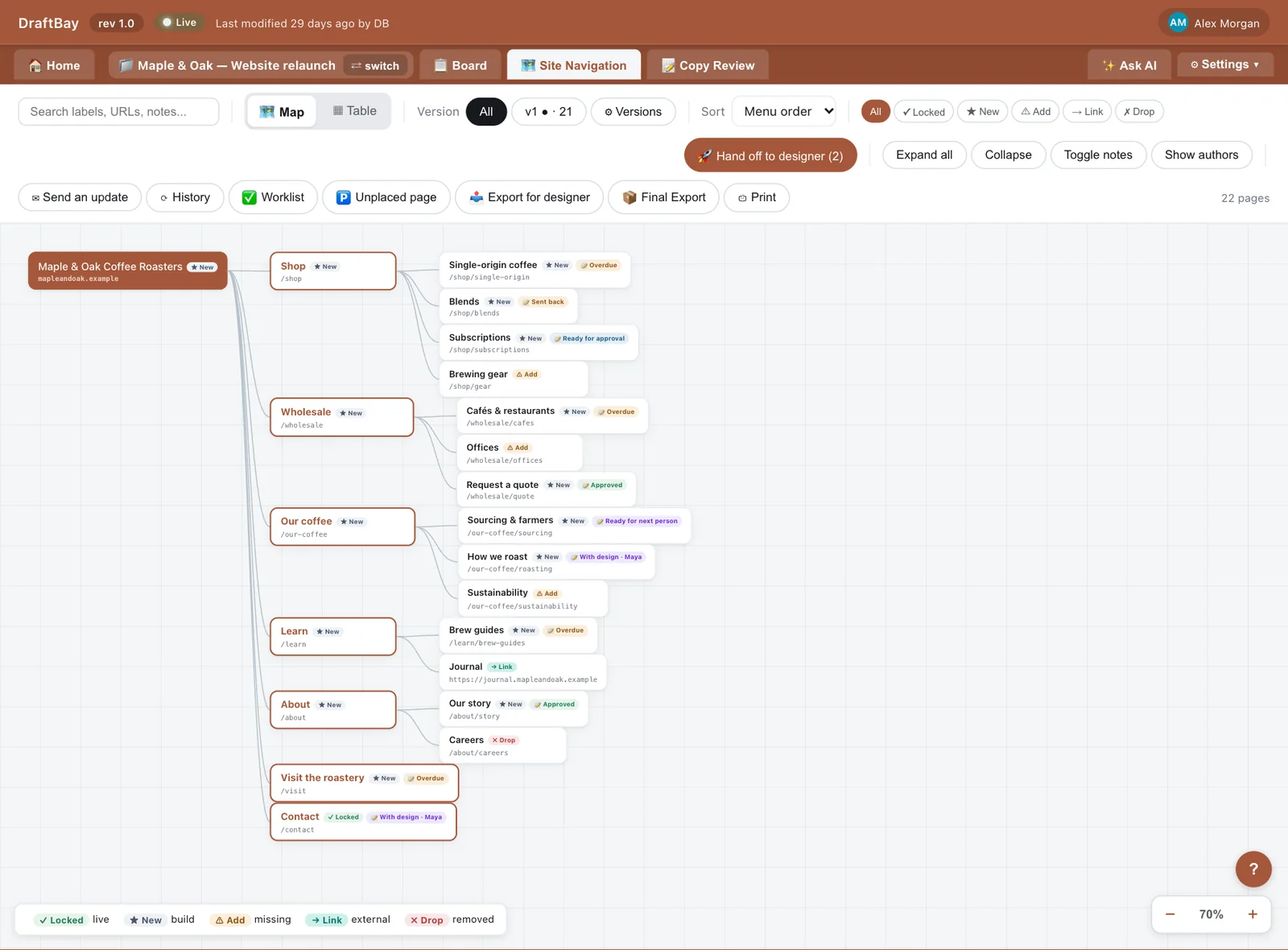
Site structure
Copy for the selected page
A miniature of the real thing — no signup needed.
The work is scattered. Nothing connects.
A sitemap in a slide, copy in a dozen Google Docs, approvals buried in email, a status spreadsheet nobody trusts. Every tool is an island — so things fall through the cracks and nobody knows what's actually done.
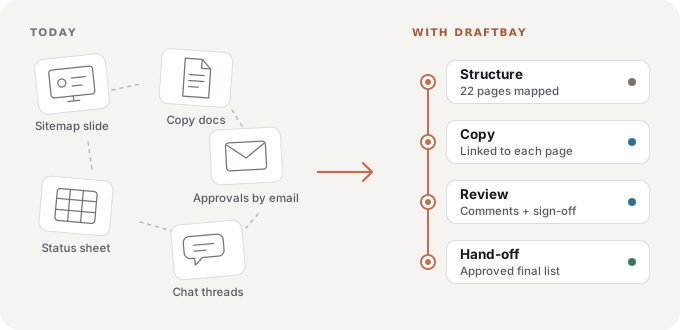
Each step shows what's next.
Every page shows where it stands and who it's waiting on, so it's easier to keep work moving and harder to miss a step.

Map the site
Build the sitemap as a mind-map or a spreadsheet-style table — or import an existing tree. One picture of every page, and the order of your pages is the order of your menu.
Connect the copy
Each page links to its copy. Request copy from a writer in one step — even for a whole section. Move a page and the links follow.
Review & sign off
Comment, @mention the person you need, send back or approve. Approval is pinned to the version you approved, and a new version needs approving again.
Hand off
Hand approved copy to your designer in one step. They get a “Your work” list with the approved version, and mark each page built. Then send the team one update with what changed. Publish connectors are coming soon.
See the whole job at a glance.
Real screens from DraftBay. The coffee company is made up; the product is not.
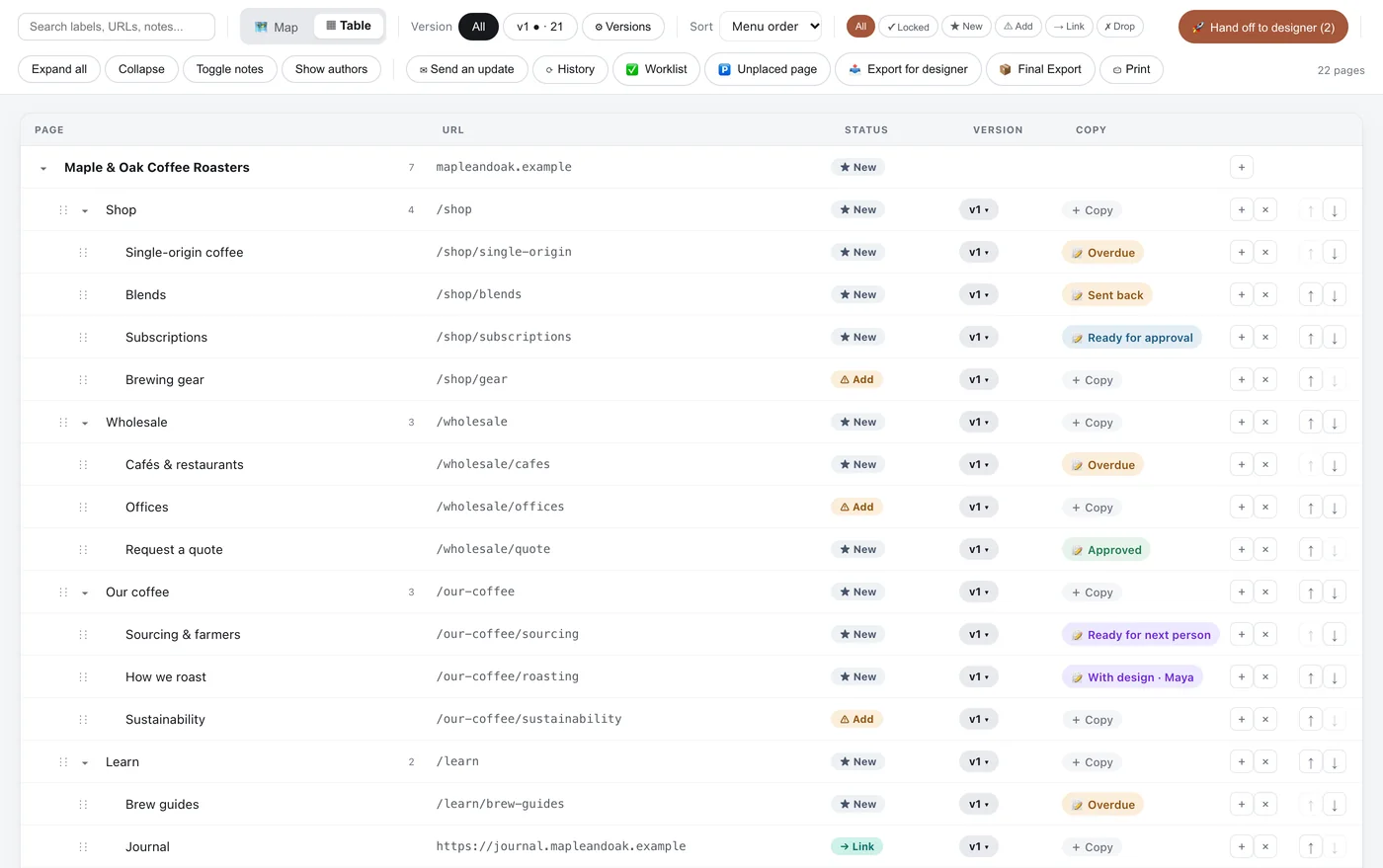
Your sitemap as a table, too.
Prefer rows to a mind-map? Flip to Table and edit the same tree inline, with every page's URL, status, website version and copy on one line.
- Expand and collapse sections
- Pages missing copy show up right away
- Add copy to any page in one click
- Drag rows, or use ↑ and ↓, to set the menu order
- Click a column to sort the view. Your menu order stays as it is.
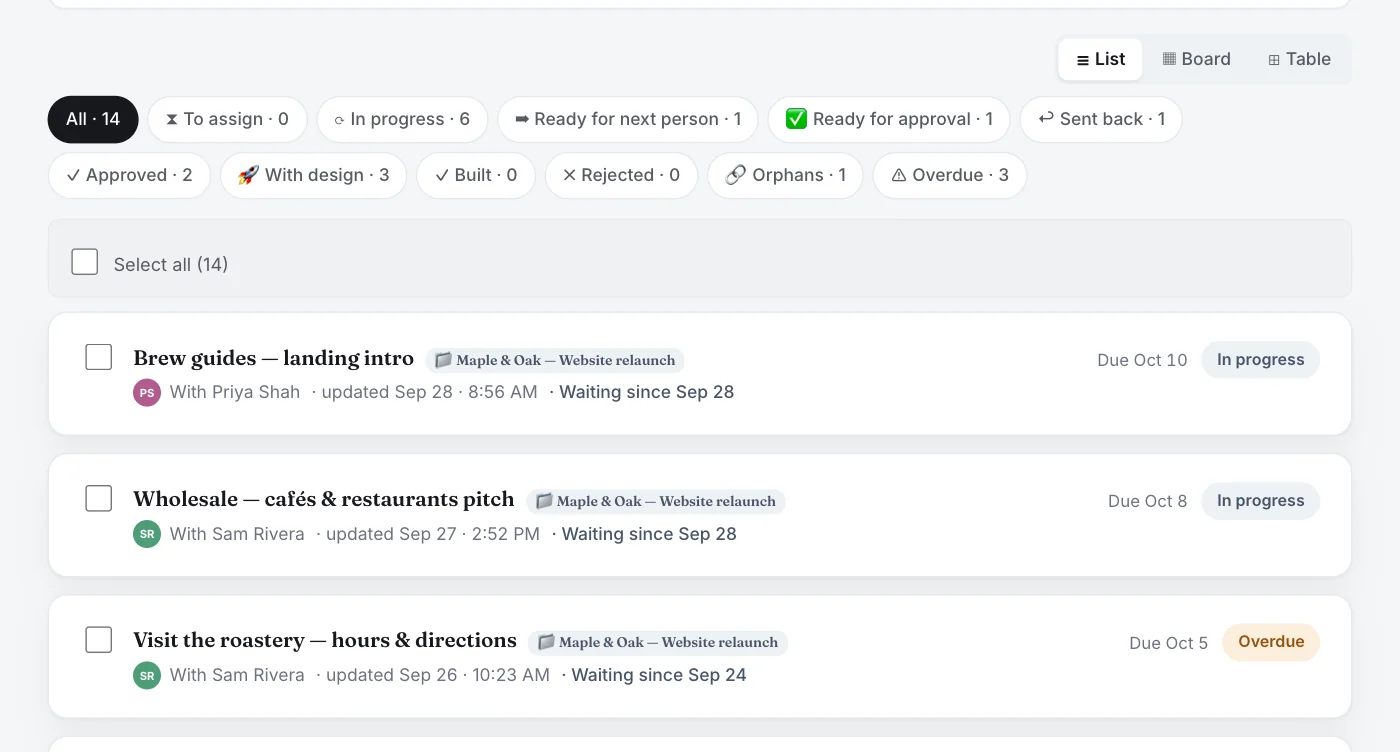
Every piece of copy, one clear status.
Who has it, when it's due, and what happens next. Filter to what's waiting on you, what's overdue, or copy that isn't linked to any page yet.
Approve with a trail behind you.
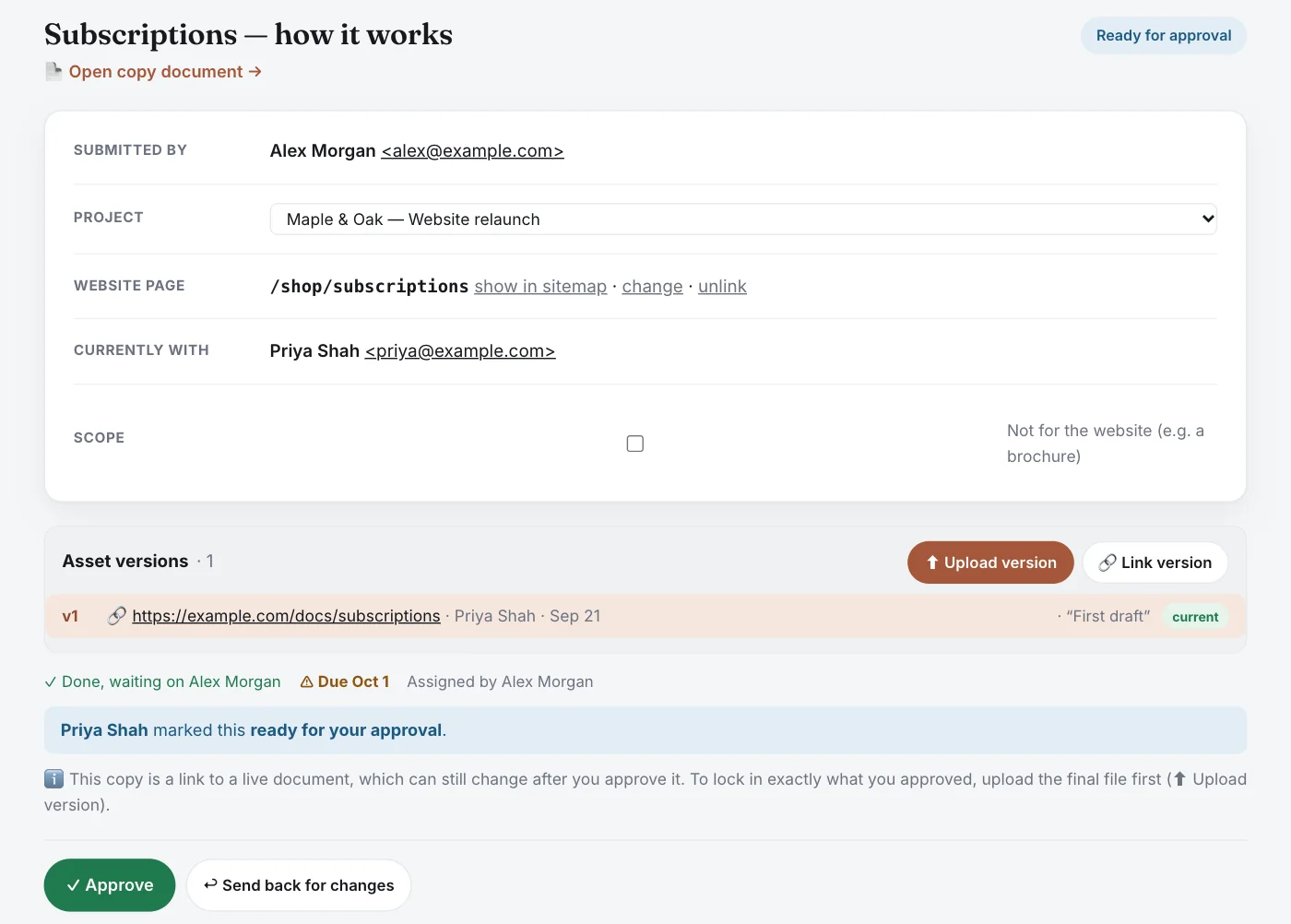
The writer marks their part done, and you get a clear "ready for your approval". Approve it, or send it back with a note. Approval is pinned to the version you approved (upload the final file to keep an exact copy), and every version and decision is kept.
Hand it to your designer. Know when it's built.
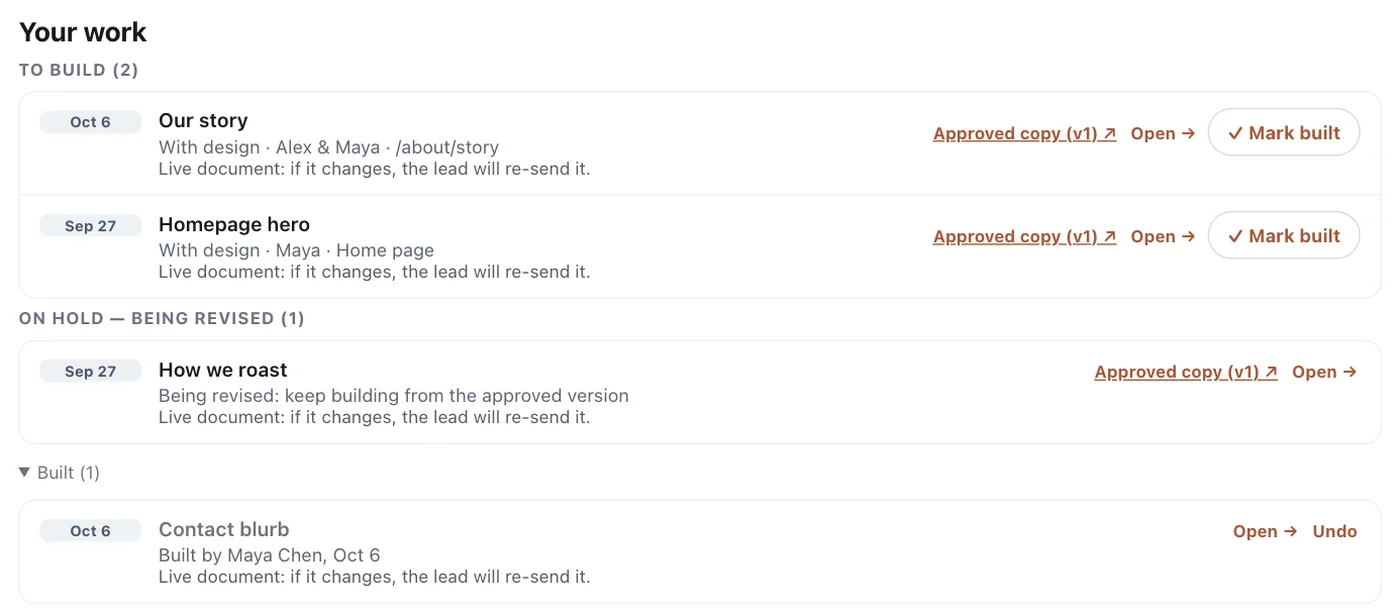
Hand approved copy to the project's designer in one step. Their “Your work” list shows what to build and what's on hold while a change is approved, each with a link to the approved version. They mark each page built when it's on the site. Or press 🚀 Hand off to designer on the sitemap. It shows how many pieces are waiting, and your designer gets one email with the list.
Everything to run your site's words.
Sitemap, two ways
A drag-and-drop mind-map and a spreadsheet-style table of the same site — expand, collapse, and edit in either.
LiveNothing orphaned
DraftBay flags copy that isn't linked to any page and marks every page still waiting for copy — so gaps show up before launch, not after.
LiveCopy requests
Assign a page — or a whole section — to a writer. They get an email with where the doc should live; you see what's late.
LiveApprovals with a trail
Clear “Ready for approval” and “Ready for next person” states, approval pinned to a version, and history with roll-back. Comment and @mention people on any page or piece of copy.
LiveAI assistant
Answers questions about your project and the page you're on, finds missing pages and copy, and suggests changes, such as handing approved copy to your designer or updating page addresses, that happen only when you approve them.
LiveYour whole team
Writers, reviewers, approvers, designers, developers and clients, with unlimited people per workspace. People who can't edit the sitemap can still comment and add files. Send everyone one update email with what changed, now or on a schedule.
LiveBe one of our first 100 Founding Members.
Help us test DraftBay and share your honest experience — and lock in $7.99/month (billed yearly at $95.88) for as long as you stay subscribed.
Who's minding the website?
AI makes copy quick to write, but someone still has to check it and say yes. The faster the words arrive, the more it helps to have a single place to review and approve them. DraftBay keeps every page, its copy and its sign-off together: one place that shows what's approved, however the words were written.
The short answers.
What is DraftBay?
DraftBay is a web app for planning a website's content in one flow: map every page in a sitemap, get the copy written, review and approve it, and hand it off to the designer or developer. It replaces the usual mix of sitemap slides, scattered documents, email approvals and status spreadsheets.
Who is DraftBay for?
Small businesses planning a new or rebuilt website, web agencies running sites for clients, and freelancers. Each workspace includes unlimited people and projects, so you can invite writers, reviewers, designers, developers and clients.
How much does DraftBay cost?
$19 a month per workspace, with unlimited people and projects, after a 14-day free trial with no credit card. The first 100 Founding Members pay US$95.88 a year ($7.99 a month), locked in while they stay subscribed.
Where does the copy live?
Anywhere with a link, such as Google Docs, SharePoint or Word online. DraftBay links each page to its copy and tracks status, comments and sign-off, while your files stay where they are. If it's in Microsoft 365, share it with your team or upload the file; DraftBay reminds you next to those links.
What does the designer or developer get at the end?
A “Your work” list of approved pages to build, each linked to the approved version, and a one-click “Export for designer” spreadsheet with every page, its address, its website version, the approved copy link and redirects. Publish connectors for Webflow, Framer and WordPress are coming soon.
What happens if approved copy changes?
It goes back for approval. If your designer already has it, it shows as “Being revised” then “Ready for re-approval”, and they keep building from the approved version. For a linked live document, upload the final file to lock its exact text.
Does DraftBay use AI?
Yes. Each project has a Board where DraftBay's checks and its AI find missing pages, pages without copy and copy waiting for approval, and ask the team clarifying questions. There's also an Ask AI assistant you can question in plain words. Ask AI can also draft text and suggest actions, such as linking copy to a page, emailing your team, handing approved copy to your designer or updating page addresses from the sitemap. Nothing happens until you approve it, and only within the projects you're on.
Give your website one connected workflow.
Free for 14 days. No credit card. Your whole team included.
Start free